Wednesday, April 23, 2014

Parts of a Motor

There are 6 main parts to an electric DC motor:

1. DC power supply-such as a battery to act as the main power source

2. Field Magnet-a magnet that creates an electric field; could be made by wrapping wire around a magnetic core. When the current runs through it, the magnet is created.

3. Axle-usually a magnetic rod where the commutator and armature are located

4. Brushes-they let the electric current flow to the electromagnet, and flip the direction of the electrons at just the right moment

5. commutator-help brushes flip the direction of the electrons and let the electric current flow; attached to the axle

6. Armature-makes an electromagnet when a metal core is wrapped in magnet wire

The Troubles of My Motor

While I was making my motor, I ran into some problems. My electromagnet and my armature were very strong, but I had a lot of trouble with the copper plating and the brushes. There were different things each time; one time it was the gaps between the copper plating were to big or another time was that I had to use steel wool to rub off the copper plating and the brushes to get rid of all the enamel. I also had to reposition the brushes many, many times (they kept getting caught onto the copper plating). But, when I finally got it to go, I felt great. It was the best feeling in the world..........then, there was a big spark and it didn't work any more. I thought the copper wire was too burnt and changed it to tinfoil, but that didn't work so well so I had to change it back. And after a few more readjustments the following morning, I got it to work consistently again and once again, I felt like I was on top of the world (that's an exaggeration).

My Motor

My motor uses an electromagnet made by running an electric current through a coil. I used 16 awg single-strand wire. I wrapped this around the base of two steel L brackets five times. Then I took a rod and cut off some of the end to use as the armature. I then tape the armature to make it even and I start to wrap 24 awg magnet wire around it. This creates another electromagnet and I did this by leaving a little bit of wire to start and I wrap down and back and then I cross over and I go down ad back until I come back to where I started. Farther down the rod, there is a cork with copper plating taped to it and the copper plating has a little bit of space between it. Rubbing up against the copper plating are 16 awg multi-strand wire used as brushes. The circuit is started with one end of the electromagnet attatched to one end of the battery, it goes through the electromagnet, which then leads to a switch (nice little touch, right?), then that leads to one of the brushes. The circuit later continues with the other brush leading to the other end of the battery. For the brushes, I made a makeshift "bridge" over the cork/copper and I drilled holes into them. Then, I tucked the brushes through the hole and make it touch the copper plating.

This is a picture of my motor working:

Monday, February 3, 2014

My Bridge

For my physics class, I need to make a bridge to support quite a bit of weight. We must use balsa wood and only glue as an adhesive. Also, the bridge can't way anymore than 100 g total. I'm not that far into the process. I have created a diagram with all the measurement for each piece and I started making the base of the bridge. I'm planning to make a Warren Truss bridge with 5 supports underneath to help even out the pressure and help absorb the the compression from the weight. There are two things that I'm worried about. One of them is not going over 100 g. And the other is hoping my bridge won't break before the competition. Other than those two things, I feel pretty confident with my designs.


Bridges

There are four key structural components that a bridge must have: beams, arches, trusses, and suspensions.

1. The beam is the base of the bridge where the cars would drive over. A beam bridge would look like this:

2. The arch distributes compression and diverts weight onto the two column making the arch. An arch bridge looks like this:


3. Trusses provides a more rigid structure and it also helps distribute the weight load more evenly.  Truss bridge look like this:


4. Suspensions are ropes or cables that hold up the roadway. A suspension bridge would look like this:


Bridges all have to deal with two problem: tension and compression. When cars or other weights are placed on a bridge, they compress the bridge downward due to gravity. Therefore, as the bridge is compressed down, it is pulled both ways by the structures at the end and the bridge's tension increases. The tension increasing could be related to tug-of-war game where both sides are pulling at the rope.


Static Equilibrium

Static Equilibrium is a physics term used to refer when the total amount of force acting upon an object adds up to zero. It could be related to a tug-of-war game. In tug-of-war, both sides pull the ropes toward themselves, but if both sides pull with the same force, the rope won't move. Static equilibrium doesn't mean there aren't any force acting on the object, it just means the forces are balanced.


As you can see, both sides pull with the same force, and as a result, the rope doesn't move.

The static equilibrium can be found using a force table. Force tables use vector forces to balance a ring in the center of the table. Someone is able to find the static equilibrium using trigonometry and Pythagorean Theorem given two forces and two angles. A more detailed lab of this procedure could be found here. Anyway, when the ring is not touching the center piece, it has reached static equilibrium.


Monday, November 11, 2013

Programming

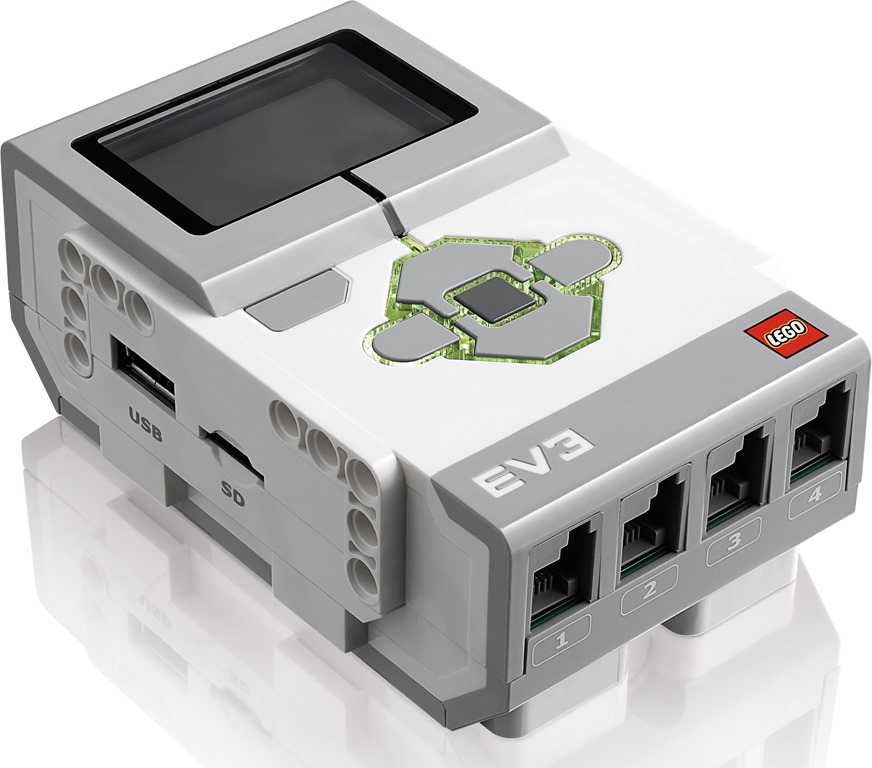
Programming is the action or process of writing computer programs. These programs are downloaded on the robot which give the robot a set of instructions of what to do and when to do them. Part of the mindstorm ev3 robot, is the ev3 brick. This brick is the "brain" of the robot. Whatever information is put into it, the robot does it. The brick is hooked up to different parts of the robot to control the "muscles" of the robot.


The information put into the brick is put in by explaining what to do when something happens. For example, when it sees the color red, it will stop, and when it sees the color green, it will go. Another example is when it notices something in its path, you can determine how far away from that object you want it to stop. There are a three different sensors that help the robot with these sort of things. This picture of Gyro Boy is going to be used as a reference:

1. On Gyro Boy's right hand, that sensor is the color sensor. You can program Gyro Boy to react to different colors in different ways.

2. On Gyro Boy's left hand, that sensor is the infrared sensor. This sensor is used to give the robot a sense of distance, direction, and if you use a remote controller, this will help with that too.

3. The last sensor, which isn't on Gyro Boy, is the touch sensor. This sensor can do a variety of things, but it goes off touch.

This is a summary of what each of the sensors do and what they look like in addition to a few of the "muscle" pieces of the robot: